





If you have ever opened ChatGPT and wondered, “What am I supposed to type?”, you are not alone.
ChatGPT is easy to start using, but getting consistently useful results requires more than typing random questions into a chat box. You need to know how to give instructions, provide context, refine responses, use the right tools and verify important information.
This guide explains how to use ChatGPT from the ground up, whether you are a complete beginner, student, professional, business owner, content creator, researcher or developer.
OpenAI describes ChatGPT as a conversational AI assistant that can help users think, write and solve problems using natural language. You can interact with it using text and, depending on the features available to your account, images, audio, files and other tools.
The biggest lesson is simple:
Do not think of ChatGPT as a search box. Think of it as an assistant that needs a clear brief.
Once you understand that difference, you can use ChatGPT for much more than answering questions.
Quick answer: How do you use ChatGPT?
To use ChatGPT:
- Open ChatGPT at chatgpt.com.
- Sign in or create an account if required.
- Start a new conversation.
- Type a question, instruction or task into the message box.
- Add context and explain what you want.
- Tell ChatGPT the format, tone or level of detail you need.
- Read the response critically.
- Ask follow-up questions to improve it.
- Use tools such as web search, file analysis, image generation, voice or deep research when appropriate.
- Verify important facts before relying on them.
You do not need to learn programming or a special computer language to use ChatGPT. OpenAI’s own beginner guidance recommends starting with ordinary tasks and refining the response through follow-up questions.
What is ChatGPT?

ChatGPT is an AI assistant developed by OpenAI. It can understand natural-language instructions and generate responses based on the context of your conversation.
It can help with tasks such as:
- Answering questions
- Explaining difficult subjects
- Writing and rewriting
- Summarizing information
- Brainstorming
- Translation
- Coding
- Research
- Data analysis
- Working with documents
- Analyzing images
- Generating images
- Voice conversations
- Planning and organizing work
The exact tools available can depend on your account, settings and subscription. OpenAI currently lists capabilities including web search, deep research, image input and generation, file uploads, data analysis, voice, Canvas and memory.
This is important because ChatGPT is no longer simply a chatbot that produces paragraphs of text.
It can function as a writing assistant, research assistant, tutor, analyst, brainstorming partner and productivity tool.
How to Use ChatGPT Step by Step
Step 1: Open ChatGPT
The easiest way to get started is to visit:
ChatGPT
You can use ChatGPT through the web interface and, where supported, through its mobile and desktop applications.
Once you open ChatGPT, you will see a conversation interface where you can enter your request.
You don’t need to begin with a complicated command.
Try:
Explain what artificial intelligence is in simple English.
ChatGPT will generate an answer.
That is your first conversation.
Step 2: Understand what a prompt is
A prompt is the instruction, question or information you give ChatGPT.
For example:
What is cloud computing?
is a prompt.
So is:
Explain cloud computing to a 15-year-old using a simple analogy and three real-world examples.
The second prompt contains more useful information, so ChatGPT has fewer things to guess.
OpenAI explains that a prompt can be text, an image, audio or a file, depending on how you interact with ChatGPT.
A simple prompt formula
A useful general formula is:
Task + Context + Requirements + Output format
For example:
Task: Write a technology article about Starlink in Nigeria.
Context: The audience is Nigerian internet users who want reliable broadband.
Requirements: Explain pricing, availability, advantages and limitations. Use simple language and current information.
Format: Use headings, short paragraphs and a FAQ section.
Compare that with:
Write about Starlink.
The first prompt gives ChatGPT a much clearer assignment.
Step 3: Tell ChatGPT exactly what you want
One of the biggest beginner mistakes is being too vague.
Instead of:
Write an article about AI.
Try:
Write a 1,500-word technology article explaining how AI is changing education in Nigeria. Target students, teachers and parents. Use a professional journalistic tone, include practical examples, explain the benefits and risks, and finish with five frequently asked questions.
The more relevant information you provide, the easier it is for ChatGPT to tailor its response.
A 2026 guide from ClickUp similarly emphasizes four important inputs: who you are, what you need, the desired format and the tone of the response.
Step 4: Give ChatGPT context
Context tells ChatGPT why you need the answer and who it is for.
For example, don’t simply say:
Write an email about a delayed payment.
Instead:
I run a small web-design company in Nigeria. A client is two weeks late paying an invoice. Write a polite but firm email requesting payment. Keep it professional and avoid sounding aggressive.
The second prompt gives ChatGPT information it can use to produce a more appropriate response.
Context can include:
- Your profession
- Your target audience
- Your location
- Your objective
- Your existing material
- Your preferred tone
- Your budget
- Your technical level
- Your constraints
- Examples of what you like
However, do not provide unnecessary confidential information simply to make a prompt more detailed.
Step 5: Tell ChatGPT how you want the answer formatted
ChatGPT doesn’t automatically know how you want an answer presented.
You can specify:
- Numbered steps
- Bullet points
- Tables
- FAQs
- A short paragraph
- An email
- A news article
- A report
- A checklist
- A presentation outline
- Code
- JSON
- A social media post
For example:
Explain five ways businesses can use AI. Put the answer in a table with columns for use case, benefit, example and difficulty level.
Or:
Summarize this report in 10 bullet points. Each bullet should contain no more than 20 words.
Format instructions can dramatically reduce the amount of editing required afterward.
Step 6: Ask follow-up questions
This is one of the most important ChatGPT skills.
You don’t have to get the perfect answer on your first prompt.
Suppose ChatGPT gives you:
Here are 10 marketing ideas…
You can continue:
Expand number 4.
Then:
Make it suitable for a Nigerian small business.
Then:
Give me a practical example.
Then:
Turn the example into a Facebook post.
ChatGPT can use the context of the ongoing conversation to refine the result.
OpenAI’s beginner guidance specifically recommends reading the response and then refining it by asking follow-up questions or adding more detail.
Useful follow-up prompts
Try:
Make this simpler.
Explain that with an example.
Give me three alternatives.
What am I missing?
Challenge this argument.
Make it more concise.
Add more detail to section 3.
Rewrite this for beginners.
Give me the advantages and disadvantages.
What assumptions are you making?
Check this for logical errors.
Turn this into a step-by-step guide.
This iterative approach is generally more effective than repeatedly starting new chats.
Step 7: Use ChatGPT for research
ChatGPT can be useful for research, but you should choose the appropriate research method.
For a simple conceptual question, ordinary chat may be enough.
For current information, use ChatGPT Search.
OpenAI says ChatGPT can automatically search the web when a question may benefit from online information. You can also explicitly select Search from the tools menu.
For example:
What are the latest smartphone launches in Nigeria?
Because smartphone launches change, a current web search is preferable to relying solely on a model’s existing knowledge.
How to use ChatGPT Search

Depending on the interface available to you:
- Open ChatGPT.
- Start a conversation.
- Enter your question.
- If necessary, select Search from the tools menu.
- Review the sources attached to the response.
- Open important sources yourself.
- Compare information when the subject is important or controversial.
ChatGPT Search is particularly useful for:
- Current news
- Recent technology launches
- Current prices
- Company announcements
- Sports results
- Government policies
- Recent research
- Travel information
- Current product information
Do not assume that a response is accurate simply because it contains citations. Read the underlying sources when accuracy matters.
Step 8: Use Deep Research for complex questions

For complicated research projects, ChatGPT offers Deep Research, where available to your account.
Deep Research is designed for multi-step questions that require gathering, comparing and synthesizing information from multiple sources.
According to OpenAI, the process involves describing the desired outcome, selecting sources, reviewing a proposed research plan, monitoring the research and receiving a structured report with citations.
Example
Instead of asking:
Tell me about the Nigerian fintech market.
You could ask for:
Research the Nigerian fintech market in 2026. Compare the major market segments, regulatory environment, leading companies, investment trends, consumer adoption, challenges and opportunities. Use authoritative sources and provide citations. Clearly distinguish verified facts from analysis.
Deep Research is better suited to substantial research than a quick question.
Step 9: Upload files to ChatGPT
One of the most useful ChatGPT features is the ability to work with documents and other files.
Depending on your account and interface, you can upload things such as:
- PDFs
- Word documents
- Spreadsheets
- Presentations
- Images
- Text files
- Data files
ChatGPT can then analyze the material.
OpenAI lists document analysis, file uploads and data analysis among ChatGPT’s capabilities.
Example: PDF analysis
Upload a 50-page report and ask:
Summarize this report in 10 key findings.
Then:
Which findings relate specifically to Nigeria?
Then:
Create a table showing the finding, evidence and page number.
Then:
Identify any contradictions in the report.
This is considerably more powerful than asking ChatGPT a general question about the subject.
Important rule
When working with important documents, tell ChatGPT to base its answer on the uploaded material.
For example:
Answer this question using only the information contained in the uploaded document. If the document does not contain the answer, say so.
That reduces the risk of mixing external information into a document-specific answer.
Step 10: Use ChatGPT with images
ChatGPT can analyze uploaded images, screenshots, diagrams and charts, where the capability is available.
For example, you can upload a screenshot and ask:
What does this error message mean?
Or upload a chart:
Explain the trend shown in this graph.
Or upload a document photograph:
Extract the text from this image and organize it into a table.
OpenAI lists image analysis and image generation among ChatGPT’s capabilities.
You can also use natural-language instructions to generate or modify images where image generation is available.
Step 11: Use ChatGPT for writing
ChatGPT can help with almost every stage of a writing workflow.
You can ask it to:
- Generate ideas
- Create an outline
- Write a first draft
- Rewrite paragraphs
- Improve clarity
- Change tone
- Simplify technical language
- Summarize text
- Generate headlines
- Create FAQs
- Proofread
- Translate content
- Turn notes into an article
For example:
Here are my rough notes. Organize them into a coherent technology news article. Do not invent facts. Identify information that needs verification.
That’s much safer and more useful than simply asking:
Write an article about this.
For professional publishing, treat AI output as a drafting and research aid, not an automatic substitute for editorial judgment.
Step 12: Use ChatGPT for studying
Students can use ChatGPT as an interactive tutor rather than simply asking it to provide answers.
For example:
Explain photosynthesis to me as if I am preparing for a secondary-school examination.
Then:
Give me five questions without the answers.
After answering them:
Mark my answers and explain my mistakes.
Then:
Give me another five questions based on the areas I got wrong.
This creates a learning loop.
You can also ask ChatGPT to:
- Explain difficult concepts
- Create revision notes
- Generate quizzes
- Explain equations
- Create flashcards
- Compare theories
- Role-play an oral examination
- Create study schedules
- Analyze uploaded class materials
The goal should be to learn with ChatGPT, rather than simply outsourcing the learning process to it.
Step 13: Use ChatGPT for coding
ChatGPT can explain programming concepts, write code, debug errors and help developers reason through technical problems.
A weak prompt is:
Fix my code.
A better prompt is:
This is a Python script that reads a CSV file and calculates monthly sales. It produces the error below. Explain why the error occurs, provide the corrected code and explain each change. Do not rewrite unrelated parts of the program.
Then paste the relevant code and error message.
You can also ask:
Review this code for security vulnerabilities.
Or:
Explain this function line by line to a beginner.
For production software, always test generated code and review it for security, correctness, dependencies and maintainability.
Step 14: Use ChatGPT for data analysis
ChatGPT can analyze structured data and, where supported, execute code in a secure environment to perform analysis and visualization.
You can upload a spreadsheet and ask:
Identify the five products with the highest sales.
Then:
Calculate month-over-month growth.
Then:
Identify unusual changes in the dataset.
Then:
Create a chart showing monthly revenue.
For business analysis, be precise about definitions.
For example, distinguish between:
- Revenue
- Profit
- Gross margin
- Growth rate
- Number of customers
- Average order value
Otherwise, ChatGPT may interpret your request differently from what you intended.
Step 15: Use Voice Mode
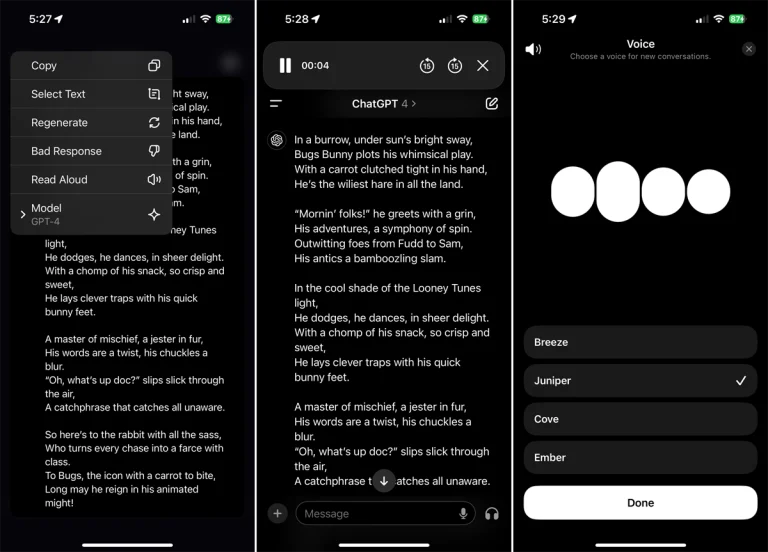
ChatGPT can support voice conversations on supported platforms and devices.
Voice can be useful when you don’t want to type.
For example:
Help me practice an interview for a software engineering job.
You can then have a conversational practice session.
Other useful applications include:
- Language practice
- Brainstorming
- Interview preparation
- Explaining concepts while walking
- Hands-free questions
- Conversational tutoring
OpenAI lists Voice Mode among ChatGPT’s available capabilities, although availability can vary by platform and account.
Step 16: Use Memory carefully
ChatGPT can use memory to personalize responses when memory is enabled.
For example, it may remember useful preferences, goals or information you have explicitly shared.
Memory can reduce repetitive instructions.
Instead of repeatedly explaining your preferred writing style, workflow or recurring project context, you may be able to let ChatGPT retain relevant information.
However, memory should not be treated as a substitute for checking important information.
You should also understand what information you are comfortable allowing an AI assistant to retain.
For sensitive or one-off conversations, consider using Temporary Chat where available.
OpenAI says Temporary Chats do not appear in chat history, do not create memories and are not used to improve models, although copies may be retained for up to 30 days for safety purposes.
Step 17: Create Projects for long-term work
If you repeatedly work on the same subject, a ChatGPT Project can be more useful than maintaining unrelated chats.
OpenAI describes Projects as workspaces where you can keep chats, files and instructions together for an ongoing effort.
For example, you could create a project called:
Website Redesign
Inside it, you could keep:
- Project requirements
- Brand guidelines
- Competitor research
- Design documents
- Content drafts
- Previous conversations
You could create another project for:
University Research
and keep relevant PDFs, notes and conversations together.
This is especially useful for projects that continue over days or weeks.
Step 18: Use Canvas for longer writing and coding tasks
Canvas is designed as an interactive workspace for writing, editing and coding alongside ChatGPT.
Instead of treating a long document as one enormous chat response, you can use a workspace designed for iterative editing.
For example:
Create a 2,000-word article about cybersecurity for small businesses.
Then work through individual sections:
Rewrite the introduction.
Make section 3 more technical.
Remove unnecessary repetition.
Add an FAQ.
This is particularly useful for long-form documents and code.
The Best ChatGPT Prompt Formula
You do not need a complicated “secret prompt.”
A strong prompt generally answers five questions:
1. What do you want?
State the task.
2. What context does ChatGPT need?
Explain the situation.
3. Who is the audience?
Tell it who will read, use or receive the output.
4. What constraints apply?
Specify length, facts, sources, tone, deadline or limitations.
5. What should the output look like?
Specify the desired format.
Example
Instead of:
Write a blog post about smartphones.
Use:
Write a 1,500-word technology article comparing affordable smartphones for Nigerian consumers. The audience is students and young professionals. Explain performance, battery life, cameras, software support and value for money. Use a neutral editorial tone. Avoid unsupported claims. Structure the article with an introduction, comparison table, individual reviews, buying advice and FAQ.
The second instruction gives ChatGPT a much clearer target.
10 Powerful ChatGPT Prompts You Can Copy
1. Learn something
Explain [topic] to me as a beginner. Start with the basic idea, then explain how it works, give three real-world examples and finish with five questions to test my understanding.
2. Research a topic
Research [topic] using reliable and current sources. Separate verified facts from analysis, cite your sources and identify any areas where reliable information is unavailable.
3. Improve writing
Rewrite the following text for clarity and readability without changing its meaning. Remove repetition, preserve important details and maintain a natural human tone: [text]
4. Analyze a document
Analyze the uploaded document. Give me the five most important findings, the evidence supporting each finding and any limitations or contradictions you identify.
5. Learn from mistakes
Review my answer below. Identify what I got wrong, explain why it is wrong and teach me the underlying concept. Do not simply give me the correct answer: [answer]
6. Brainstorm
Generate 20 ideas for [topic]. Group them into beginner, intermediate and advanced ideas. Rank them by potential impact and explain your top five choices.
7. Write professionally
Act as an experienced [profession]. Help me create [deliverable] for [audience]. Use a professional but natural tone and avoid unnecessary jargon.
8. Challenge an idea
Act as a critical reviewer. Analyze this idea, identify its strongest arguments, weaknesses, hidden assumptions, risks and possible counterarguments: [idea]
9. Make information simpler
Explain this subject using plain English. Assume I have no technical background. Use one analogy, three examples and a short summary at the end.
10. Improve a previous answer
Review your previous answer. Identify anything unclear, unsupported or incomplete. Then provide an improved version that addresses those weaknesses.
How to Get Better Answers From ChatGPT
Be specific
Bad:
Tell me about marketing.
Better:
Explain five digital marketing strategies a small Nigerian restaurant can use with a ₦100,000 monthly budget.
Give examples
If you want a particular style, show ChatGPT an example.
For instance:
Here is an example of the writing style I want. Analyze its tone and structure, then use those characteristics when rewriting my text.
Set boundaries
Tell ChatGPT what not to do.
For example:
Do not invent statistics.
Do not use emojis.
Do not change the meaning.
Do not make assumptions about missing information.
If you are uncertain, say so.
Ask it to identify uncertainty
A powerful instruction is:
Identify any claims in your answer that require verification.
This is especially useful for journalism, research, law, finance, medicine, politics and other high-stakes topics.
What You Should Never Assume About ChatGPT
ChatGPT is powerful, but it is not automatically correct.
AI models can produce incorrect statements, misunderstand questions, make unsupported assumptions or present an answer confidently when the underlying information is wrong.
OpenAI itself advises responsible use and warns that models can sometimes produce incorrect information.
Therefore:
Do not blindly trust ChatGPT for important information.
Verify:
- Statistics
- Medical information
- Legal information
- Financial information
- Current events
- Prices
- Government policies
- Product specifications
- Academic citations
- Historical claims
- Names and dates
- Quotes
For current information, use web search and inspect the underlying sources.
ChatGPT Privacy: What You Should Know
Privacy is one of the most important parts of learning how to use ChatGPT responsibly.
For personal ChatGPT accounts, OpenAI provides Data Controls that allow users to choose whether new conversations are used to improve its models. The setting can be changed under Settings → Data Controls → Improve the model for everyone.
If you turn that option off, OpenAI says new conversations will not be used to train its models, although they can still remain in your chat history.
Temporary Chat provides another option for conversations that you do not want appearing in your history or contributing to memory.
Avoid entering sensitive information unnecessarily
Do not casually paste:
- Passwords
- Banking credentials
- Authentication codes
- Private encryption keys
- Confidential company information
- Sensitive customer databases
- Personal identification documents
Even when using an AI system with privacy controls, good information-security practice is to minimize the sensitive information you submit.
How to Use ChatGPT for Work
ChatGPT can become considerably more useful when you turn repeated tasks into workflows.
For example, a marketing professional could create a workflow like:
Research → Analyze → Outline → Draft → Edit → Fact-check → Publish
A journalist might use:
Find topic → Research → Verify sources → Interview questions → Draft → Edit → Fact-check
A student might use:
Learn concept → Practice → Test → Review mistakes → Repeat
The important shift is from:
“ChatGPT, write this for me.”
to:
“ChatGPT, help me complete this workflow.”
That distinction can make the tool much more valuable.
How Nigerians Can Use ChatGPT
ChatGPT can be applied to many everyday Nigerian use cases.
Students
- WAEC and JAMB study support
- University research
- Essay planning
- Mathematics explanations
- Coding practice
- Revision questions
Entrepreneurs
- Business ideas
- Market research
- Business plans
- Customer-service scripts
- Product descriptions
- Marketing campaigns
Freelancers
- Proposals
- Client emails
- Content ideas
- Research
- Coding
- CV improvement
Content creators
- YouTube ideas
- Video scripts
- Headlines
- Social captions
- Content calendars
- Audience research
Professionals
- Meeting summaries
- Reports
- Presentations
- Emails
- Data analysis
- Research
For Nigerian users, context matters. Instead of asking:
What are the best payment methods?
ask:
Compare payment options commonly available to small businesses in Nigeria. Consider transaction costs, customer convenience, settlement time and availability.
The location changes the usefulness of the answer.
Common ChatGPT Mistakes Beginners Make
1. Asking vague questions
A vague prompt forces ChatGPT to guess.
Solution: Give context and specify the desired result.
2. Expecting one prompt to produce perfection
Complex work usually requires iteration.
Solution: Review the answer and refine it.
3. Treating ChatGPT like Google
ChatGPT and search engines solve different problems.
Solution: Use Search when you need current information and ordinary chat when you need reasoning, drafting or explanation.
4. Accepting every answer as fact
AI can make mistakes.
Solution: Verify important claims.
5. Giving too little context
Without context, ChatGPT may produce generic answers.
Solution: Explain your situation, audience and objective.
6. Giving too much irrelevant information
More information does not automatically mean a better prompt.
Solution: Give relevant context.
7. Asking ChatGPT to do everything at once
A huge instruction can produce an inconsistent result.
Solution: Break complex work into stages.
8. Uploading sensitive information unnecessarily
This creates avoidable privacy risks.
Solution: Remove confidential information before uploading documents.
9. Not specifying the desired format
You may receive a technically correct answer in an inconvenient form.
Solution: Say whether you want a table, article, list, email, report or another format.
10. Failing to tell ChatGPT when it is wrong
If the response is incorrect, correct it.
For example:
That information is incorrect. The correct figure is X. Rework the answer using this information and explain how it changes your conclusion.
ChatGPT vs Google: Which Should You Use?
The answer is: both, depending on the task.
| Task | Better starting point |
|---|---|
| Explain a difficult concept | ChatGPT |
| Brainstorm ideas | ChatGPT |
| Rewrite text | ChatGPT |
| Summarize your document | ChatGPT |
| Analyze a spreadsheet | ChatGPT |
| Current news | ChatGPT Search |
| Find a specific website | Search engine |
| Compare current products | ChatGPT Search + sources |
| Deep multi-source research | Deep Research |
| Find a local business | Search/maps |
| Verify an important claim | Multiple authoritative sources |
The distinction is becoming less rigid because ChatGPT itself can search the web and provide source-backed answers.
A Simple 5-Minute ChatGPT Workflow
If you are completely new to ChatGPT, try this exercise.
Minute 1: Ask a question
Explain artificial intelligence in simple terms.
Minute 2: Ask for an example
Give me three real-world examples.
Minute 3: Personalize it
Explain how AI could help someone running a small business in Nigeria.
Minute 4: Challenge the answer
What are the biggest risks of using AI for these tasks?
Minute 5: Turn it into an action plan
Give me five things I can do this week to start using AI in my business.
In five minutes, you have experienced the basic ChatGPT workflow:
Ask → clarify → personalize → challenge → act.
Frequently Asked Questions About How to Use ChatGPT
How do I use ChatGPT for the first time?
Open ChatGPT, start a conversation and type what you want help with. You can ask a question, provide an instruction or upload supported content. You don’t need technical knowledge or programming skills to begin.
Is ChatGPT free to use?
ChatGPT has a free offering, while paid plans provide access to additional capabilities, higher limits or other features depending on the current plan. Available features and limits can change, so check OpenAI’s current product information before choosing a plan.
Do I need to know how to write prompts?
No. You can communicate with ChatGPT using ordinary language. However, learning to give clear instructions can substantially improve the quality and usefulness of its responses.
What is the best way to ask ChatGPT a question?
Explain what you need, provide relevant context, specify your audience or goal and tell ChatGPT what format you want.
A useful structure is:
Task + Context + Requirements + Format
Can ChatGPT access the internet?
ChatGPT can use web search to find current information when the feature is available and appropriate. OpenAI says ChatGPT can automatically search the web when a question may benefit from online information.
Can ChatGPT read PDF files?
ChatGPT supports working with uploaded files such as PDFs and can use their contents for tasks such as summarization and analysis, subject to account and file limitations.
Can ChatGPT analyze images?
Yes. OpenAI lists image input and analysis among ChatGPT’s capabilities.
Can I talk to ChatGPT instead of typing?
Yes. Voice Mode is available on supported platforms and accounts.
Can ChatGPT write an entire article?
Yes, it can generate drafts and help with research, outlines, editing and rewriting. However, professionally published content should be reviewed, fact-checked and edited by a human.
Can ChatGPT make mistakes?
Yes. ChatGPT can produce inaccurate information. Important information should be independently verified, particularly in high-stakes situations.
Does ChatGPT remember previous conversations?
Depending on your settings, ChatGPT can use memory and conversation context to personalize responses. Projects can also maintain context for long-running work.
What is Temporary Chat?
Temporary Chat starts a conversation without using or creating memories for personalization and does not appear in your history. OpenAI says Temporary Chats are not used to improve its models and may be retained for up to 30 days for safety purposes.
How can I stop my chats from being used to train ChatGPT?
On a personal ChatGPT account, go to Settings → Data Controls → Improve the model for everyone and turn the option off. OpenAI says new conversations will then not be used to train its models.
What should I avoid putting into ChatGPT?
Avoid unnecessarily sharing passwords, financial credentials, authentication codes, private keys, confidential business information and other highly sensitive data.
Final Takeaway: How to Use ChatGPT Effectively
Learning how to use ChatGPT is not really about memorizing hundreds of prompts.
It is about learning how to communicate a task clearly.
Start with a simple request. Add context. Explain what you want. Specify the format. Review the answer. Ask follow-up questions. Use web search when information needs to be current. Upload documents when the answer depends on your files. Use Deep Research for complex multi-source research. Use Projects for ongoing work. And always verify important information.
The most useful mental model is:
ChatGPT is not an answer machine. It is an interactive assistant.
The quality of your interaction depends heavily on how clearly you define the problem.
Once you stop asking only “What can ChatGPT tell me?” and start asking “How can I use ChatGPT to accomplish this task?”, the range of things you can do with it becomes much larger.
The simplest formula to remember
Tell ChatGPT:
What you need + why you need it + who it is for + important constraints + what the final result should look like.
Then review the response and keep refining it.
That is the foundation for using ChatGPT effectively in 2026.
Sources and further reading
For the most current information about ChatGPT’s features, tools and privacy controls, consult OpenAI’s official resources:
- OpenAI Academy: Getting Started with ChatGPT
- OpenAI Academy: Using ChatGPT
- OpenAI Help: ChatGPT Capabilities Overview
- OpenAI Help: ChatGPT Search
- OpenAI Help: Deep Research
- OpenAI Help: Projects in ChatGPT
- OpenAI Help: Data Controls FAQ

The WIRED.Africa's Press Desk delivers breaking news, official announcements, and timely updates on technology, business, innovation, and digital policy. Stories published under this byline are produced through the collaborative efforts of the editorial team and trusted news sources.




1 comment