



Linking your National Identification Number (NIN) to your mobile number remains compulsory in Nigeria. If you’re wondering how to link NIN to Airtel, there are several easy ways to complete the process without visiting a physical office.
Airtel subscribers can link their NIN using USSD codes, Airtel’s online portal, the Airtel Thanks app, or by visiting an Airtel customer service centre.
This guide explains all available methods and how to confirm that your line has been successfully linked.
Why You Need to Link Your NIN to Airtel
The Nigerian Communications Commission (NCC) and the National Identity Management Commission (NIMC) require all SIM cards to be linked to a valid NIN.
The policy helps:
- Improve national security.
- Prevent identity theft and telecom fraud.
- Maintain accurate subscriber records.
- Reduce criminal misuse of SIM cards.
- Ensure uninterrupted access to telecom services.
Failure to comply may result in restrictions on voice calls, SMS, and internet access.
Requirements Before Linking
Before you begin, ensure you have:
- A valid 11-digit National Identification Number.
- Your Airtel SIM card.
- Access to the number you want to link.
- Internet access if using online methods.
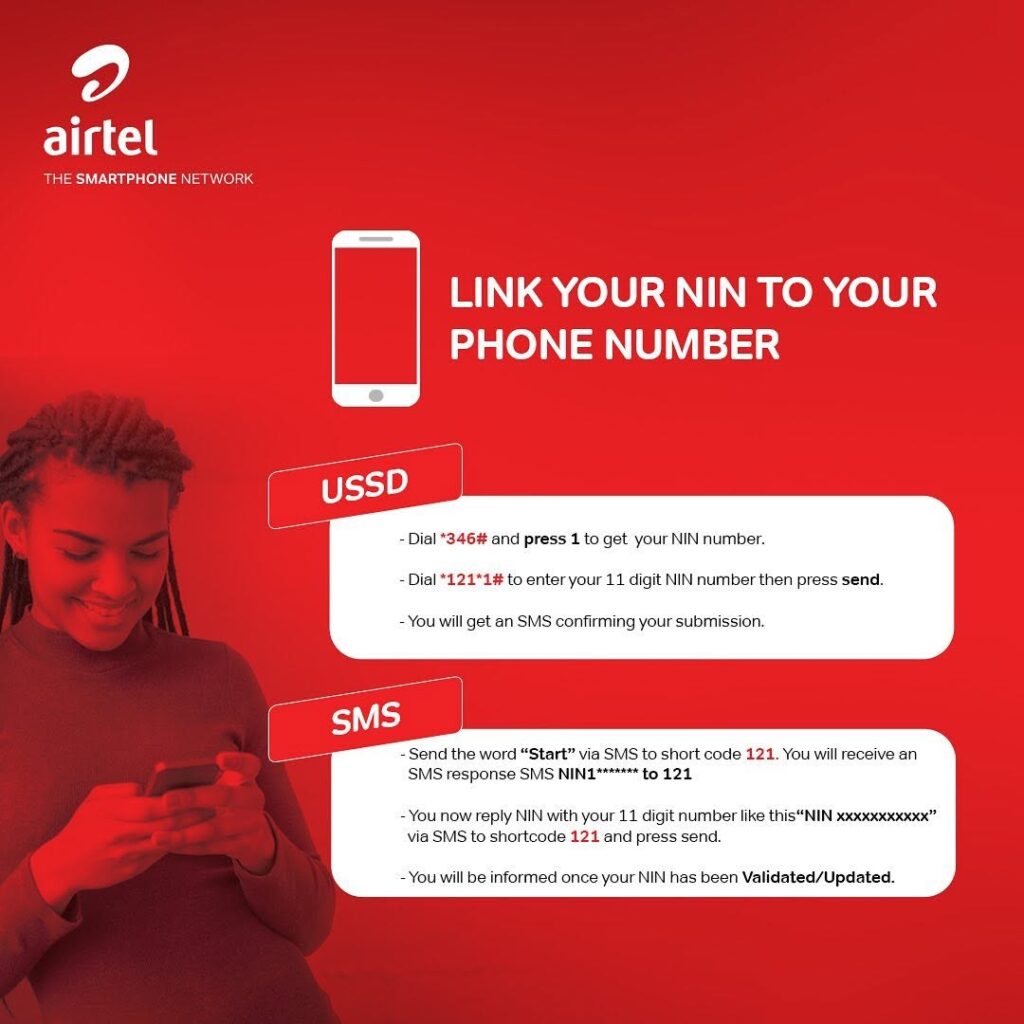
If you don’t know your NIN, dial:
*346#
(Standard NIMC charges may apply.)
Method 1: How to Link NIN to Airtel Using USSD
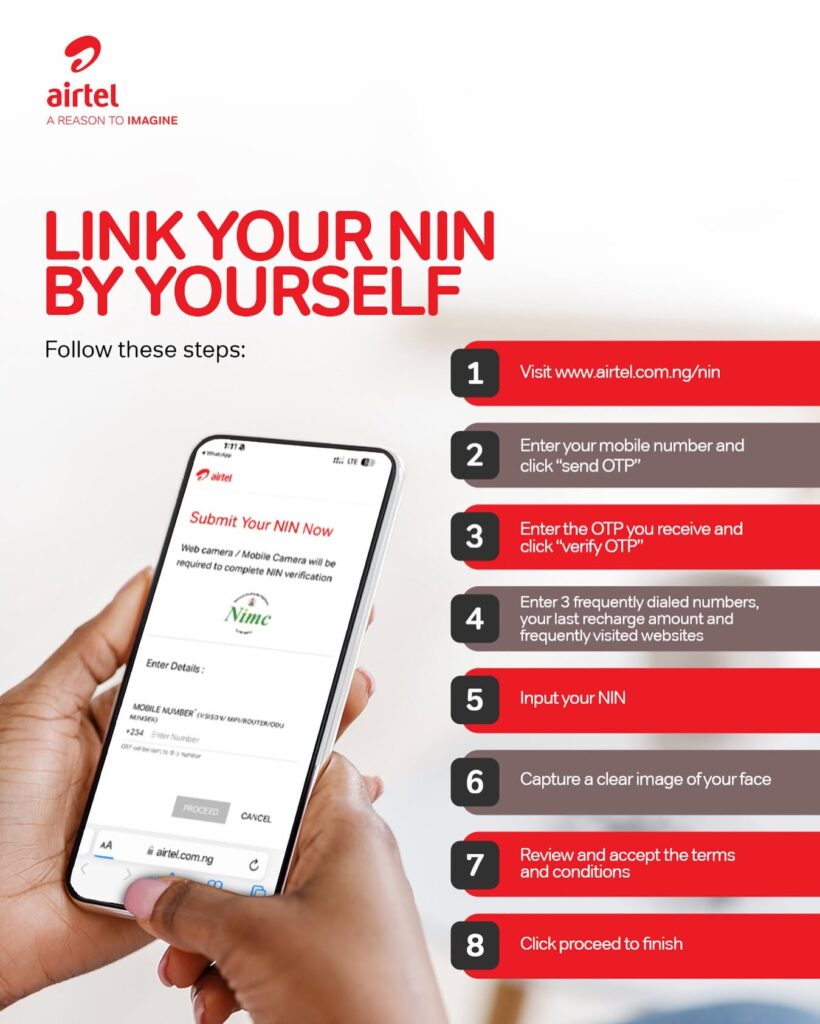
The easiest way to link your NIN is through USSD.
Step 1
Dial:
*121*1#
Step 2
Select the NIN linking option.
Step 3
Enter your 11-digit NIN.
Step 4
Confirm your details.
Step 5
Wait for an SMS confirming successful submission.
This process works on all phones and does not require internet access.
Method 2: Link NIN to Airtel Using the Direct Code
You can also dial:
*121*1*NIN#For example:
*121*1*12345678901#After submission, Airtel will process the request and notify you by SMS.
Method 3: How to Link NIN to Airtel Online
Subscribers can also complete the process online.
Step 1
Visit Airtel Nigeria’s NIN linking portal.
Step 2
Enter your Airtel phone number.
Step 3
Verify the OTP sent to your number.
Step 4
Input your 11-digit NIN.
Step 5
Submit the request.
The portal allows users to verify whether the linkage has been completed.
Method 4: Link NIN Through the Airtel Thanks App
Smartphone users can use the Airtel Thanks app.
Steps
- Download and open the app.
- Log in with your Airtel number.
- Navigate to NIN services.
- Enter your NIN.
- Submit the request.
- Wait for confirmation.
Method 5: Visit an Airtel Service Centre
If you experience any difficulties, visit an Airtel service centre with:
- Your NIN slip.
- Valid identification.
- Your Airtel SIM card.
Customer care representatives can assist with the process.
How to Check if Your NIN Is Linked to Airtel
Sometimes users continue receiving reminder messages after linking.
To verify your status:
Option 1
Dial:
*121#
Follow the prompts to check your NIN status.
Option 2
Contact Airtel customer care.
Option 3
Visit an Airtel service centre.
Can One NIN Be Linked to Multiple Airtel Numbers?
Yes.
NIMC regulations permit subscribers to link multiple phone numbers registered in their name to one NIN.
This includes:
- Personal lines
- Business lines
- Broadband devices
- Routers and MiFi devices
Common Problems and Solutions
Invalid NIN
Ensure you entered the correct 11-digit number issued by NIMC.
Name Mismatch
Differences between your SIM registration details and NIN records may prevent successful linkage.
Visit:
- An Airtel service centre.
- A NIMC enrolment centre.
to update your records.
No Confirmation Message
Processing may take time.
Wait 24 hours and try again.
Network Issues
Poor network conditions may interrupt USSD requests.
Try again later or use Airtel’s online portal.
Frequently Asked Questions
Is linking NIN to Airtel free?
Yes. Airtel does not charge subscribers for linking their NIN.
What is the Airtel NIN code?
Dial:
*121*1#
and follow the prompts.
Can I link my NIN without internet?
Yes.
USSD codes work on all mobile phones and require no internet connection.
Can one NIN be linked to multiple Airtel numbers?
Yes, provided those lines belong to you.
How do I know if my Airtel line has been linked?
You can check through *121#, customer care, or an Airtel service centre.
Final Thoughts
Understanding how to link NIN to Airtel is essential for every Airtel subscriber in Nigeria. Whether you choose USSD, the online portal, the Airtel Thanks app, or a customer service centre, the process is simple and free.
Completing the linkage helps prevent service interruptions and ensures compliance with NCC and NIMC regulations. For most users, dialing *121*1# remains the quickest and easiest option.

Tech Desk at WIRED.Africa reports on cybersecurity, platform security, AI systems, and technical analysis of digital infrastructure shaping Africa and global tech.